Overview of the Forms Dashboard
Here’s what to do:
1. Read the text
2. Select ‘Mark Complete’
Overview of the Forms Dashboard
To get to the Forms module, navigate to Menu > Administration > Forms. This will bring you to the dashboard that will look similar to the one below. It will have different options, depending on the role the user has been set up with.
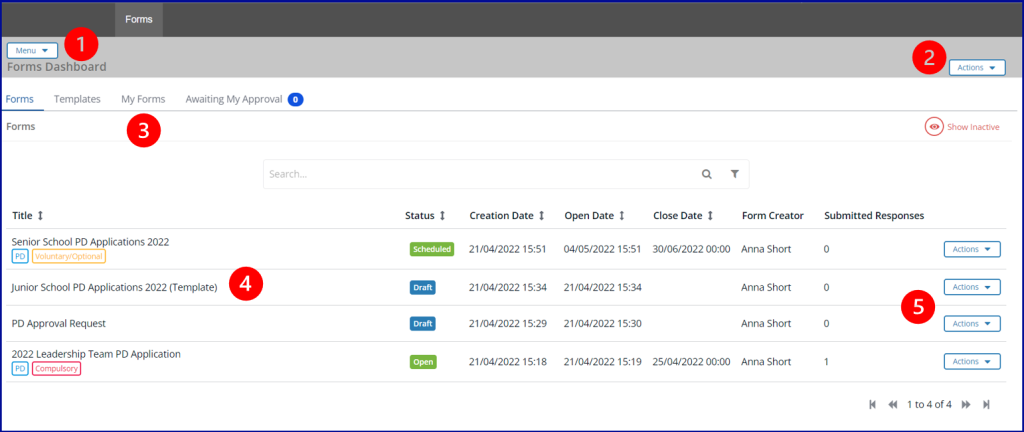
1. The Menu, which gives access to other parts of the module.
2. The Actions button, which shows all the actions that are available on this page.
3. The workflow areas within the Forms module, which may be different depending on the user’s role.
| Workflow Area | Description |
| Forms | Existing, active forms are displayed on this page |
| Templates | Sets of questions that have been saved to allow easy reuse |
| My Forms | A list of any forms that you need to respond to |
| Awaiting My Approval | All form responses that need to be reviewed and approved by you |
4. The forms that apply to this workflow area.
5. The Actions button which shows the actions that are specific to the individual form.